
管理者がオーナーを管理するための、オーナー一覧でページネーションを実装していきます。
開発環境
・Laravel Framework 8.83.27
・PHP 8.2.4
実装
class OwnersController extends Controller
{
    /**
     * Display a listing of the resource.
     *
     * @return \Illuminate\Http\Response
     */
    public function index()
    {
        // $owners = Owner::select('name', 'id', 'email', 'created_at')->get();
        $owners = Owner::select('name', 'id', 'email', 'created_at')->paginate(10);
        return view('admin.owners.index', compact('owners'));
    }
}
通常はgetで情報を取得しますが、ページネーション機能を実装する場合は、paginateに変更します。
paginateの中の数字は、1ページに表示させるオーナーの数です。
<table class="table-auto w-full text-left whitespace-no-wrap">
    <thead>
      <tr>
        <th class="px-4 py-3 text-center title-font tracking-wider font-medium text-gray-900 text-sm bg-gray-100 rounded-tl rounded-bl">オーナー名</th>
        <th class="px-4 py-3 text-center title-font tracking-wider font-medium text-gray-900 text-sm bg-gray-100">ID</th>
        <th class="px-4 py-3 text-center title-font tracking-wider font-medium text-gray-900 text-sm bg-gray-100">メールアドレス</th>
        <th class="px-4 py-3 text-center title-font tracking-wider font-medium text-gray-900 text-sm bg-gray-100">登録日</th>
        <th class="px-4 py-3 text-center title-font tracking-wider font-medium text-gray-900 text-sm bg-gray-100">削除</th>
        <th class="px-4 py-3 text-center title-font tracking-wider font-medium text-gray-900 text-sm bg-gray-100 rounded-tr rounded-br">情報修正</th>
      </tr>
    </thead>
    <tbody>
        @foreach($owners as $owner)
            <tr>
              <td class="px-4 py-3">{{ $owner->name }}</td>
              <td class="px-4 py-3">{{ $owner->id }}</td>
              <td class="px-4 py-3">{{ $owner->email }}</td>
              <td class="px-4 py-3">{{ $owner->created_at->diffForHumans() }}</td>
              <td class="px-4 py-3">
                <form id="delete_{{ $owner->id }}" method="POST" action="{{ route('admin.owners.destroy', ['owner' => $owner->id]) }}">
                  @csrf
                  @method('delete')
                  <a data-id="{{ $owner->id }}" onclick="deletePost(this)" class="block text-center m-2 text-white bg-red-500 border-0 py-2 px-4 focus:outline-none hover:bg-red-600 rounded">削除</a>
                </form>
              </td>
              <td class="px-4 py-3">
                <a href="{{ route('admin.owners.edit', ['owner' => $owner->id]) }}" class="block text-center m-2 text-white bg-indigo-500 border-0 py-2 px-4 focus:outline-none hover:bg-indigo-600 rounded">編集</a>
              </td>
            </tr>
        @endforeach
    </tbody>
</table>
{{ $owners->links() }}
後は、ページネーションを配置したい箇所に、「{{ $owners->links() }}」と記述するだけです。
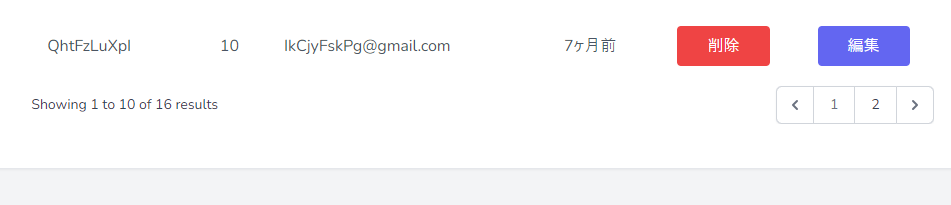
この状態では、英語表記のままなので、日本語対応します。
php artisan vendor:publish --tag=laravel-pagination上記のコマンドを実行することで、「resources\views\vendor」のフォルダーが生成されます。
「resources\views\vendor\pagination\tailwind.blade.php」の修正します。
<!-- 初期設定 -->
<div>
    <p class="text-sm text-gray-700 leading-5">
        {!! __('Showing') !!}
        @if ($paginator->firstItem())
            <span class="font-medium">{{ $paginator->firstItem() }}</span>
            {!! __('to') !!}
            <span class="font-medium">{{ $paginator->lastItem() }}</span>
        @else
            {{ $paginator->count() }}
        @endif
        {!! __('of') !!}
        <span class="font-medium">{{ $paginator->total() }}</span>
        {!! __('results') !!}
    </p>
</div>
<!-- 変更後 -->
<div>
    <p class="text-sm text-gray-700 leading-5">
      <span class="font-medium">{{ $paginator->total() }}</span>
      件中
        @if ($paginator->firstItem())
            <span class="font-medium">{{ $paginator->firstItem() }}</span>
            件~
            <span class="font-medium">{{ $paginator->lastItem() }}</span>
            件 を表示
        @else
            {{ $paginator->count() }}
        @endif
    </p>
</div>