
Laravel8でLaravel Breezeを使用して、マルチログイン機能の実装の解説です。
楽天やAmazonのような複数の販売者がいる、ECサイトのプラットフォームです。
ユーザーと販売者と管理者の3タイプのログインを切り替えます。
開発環境
・Laravel Framework 8.83.27
・PHP 8.2.4
タイプ別のURL
ユーザー(商品購入者)・・・https://www.sample.com/
販売者(商品の登録)・・・・https://www.sample.com/owner/
オーナー(販売者の管理)・・https://www.sample.com/admin/
流れ
1.認証ライブラリのインストール
2.モデル、マイグレーション作成
3.ルート設定
4.ルートサービスプロバイダ設定
5.ガード設定
6.ミドルウェア設定
7.リクエストクラス設定
8.コントローラー&ブレード作成
認証ライブラリ
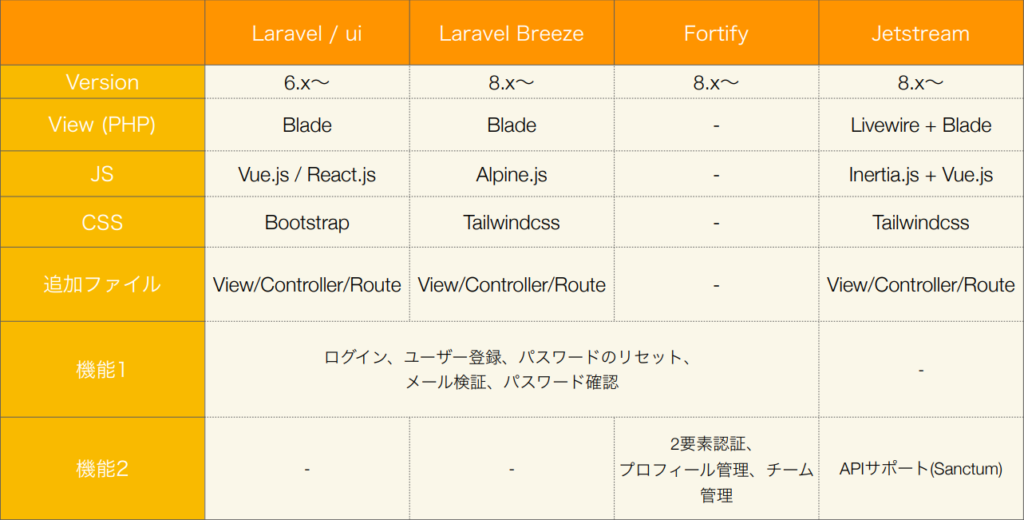
手順
1.Laravel Breeze(認証ライブラリ)のインストール
# Laravel Breeze(認証ライブラリ)のインストール
composer require laravel/breeze --dev
# バージョン指定
composer require laravel/breeze "1.*" ̶--dev
php artisan breeze:install
npm install
npm run dev
php artisan migrate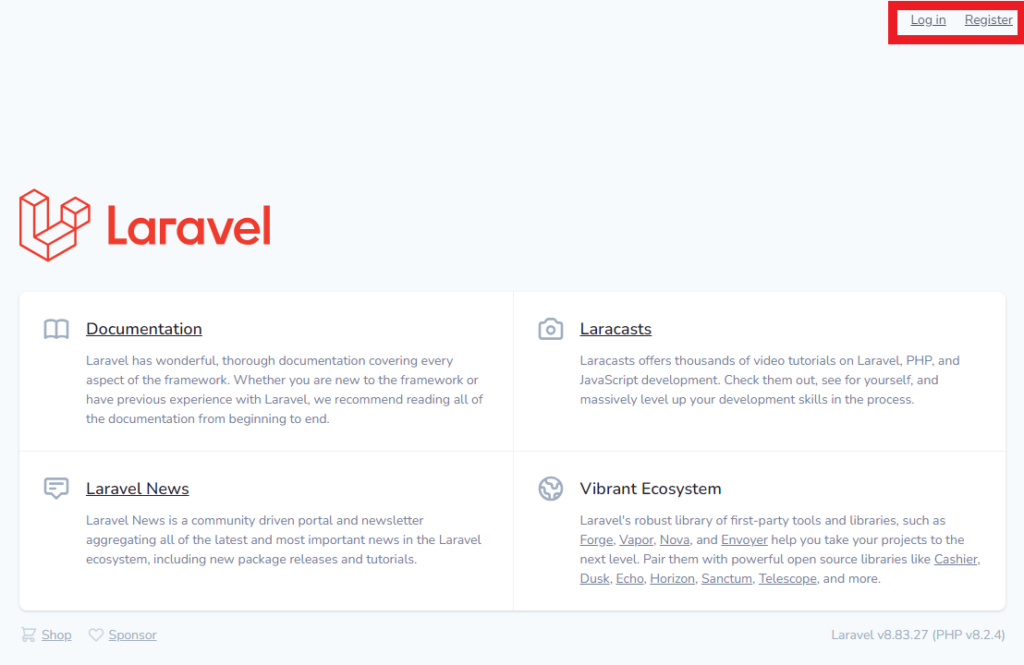
Laravel Breezeの日本語化
現状のままでは、ログイン画面や新規会員登録画面のフロントとバリデーションが英語のままなので、日本語化する必要があります。
下記5つのファイルを作成
・resources/lang/ja/auth.php
コード:https://readouble.com/laravel/8.x/ja/auth-php.html
・resources/lang/ja/pagination.php
コード:https://readouble.com/laravel/8.x/ja/pagination-php.html
・resources/lang/ja/passwords.php
コード:https://readouble.com/laravel/8.x/ja/passwords-php.html
・resources/lang/ja/validation.php
コード:https://readouble.com/laravel/8.x/ja/validation-php.html
# 上記のコードの最後に追記
'attributes' => [
 'name' => '名前', // 追加
 'email' => 'メールアドレス', // 追加
 'password' => 'パスワード' // 追加
 ],
・resources/lang/ja.json
{"Whoops! Something went wrong.":"おっと、なにかがうまくいかなかったようです"}2.モデル、マイグレーション作成
# 「-m」を付与することでマイグレーションファイルの自動生成
php artisan make:model Owner -m
php artisan make:model Admin -m
2-1.モデルの修正
コマンドで生成されたmodelファイルのAdmin.phpとOwner.phpの修正を行います。
Breezeをインストールした時に生成される「app/Models/User.php」をコピペします。
<?php

namespace App\Models;

use Illuminate\Database\Eloquent\Factories\HasFactory;
use Illuminate\Database\Eloquent\Model;
use Illuminate\Foundation\Auth\User as Authenticatable; // 追加

// class Owner extends Model
// ModelからAuthenticatableに変更
class Owner extends Authenticatable
{
    use HasFactory;

    // 以下追加
    /**
     * The attributes that are mass assignable.
     *
     * @var array<int, string>
     */
    protected $fillable = [
        'name',
        'email',
        'password',
    ];

    /**
     * The attributes that should be hidden for serialization.
     *
     * @var array<int, string>
     */
    protected $hidden = [
        'password',
        'remember_token',
    ];

    /**
     * The attributes that should be cast.
     *
     * @var array<string, string>
     */
    protected $casts = [
        'email_verified_at' => 'datetime',
    ];
}
2-2.マイグレーションの修正
同じくコマンドで生成されたmigrationsファイルの「日付_create_owners_table.php」と「日付_create_admins_table.php」の修正を行います。
Breezeをインストールした時に生成される「database/migrations/2014_10_12_000000_create_users_table.php」をコピペします。
<?php

use Illuminate\Database\Migrations\Migration;
use Illuminate\Database\Schema\Blueprint;
use Illuminate\Support\Facades\Schema;

class CreateOwnersTable extends Migration
{
    /**
     * Run the migrations.
     *
     * @return void
     */
    public function up()
    {
        Schema::create('owners', function (Blueprint $table) {
            // 変更点
            $table->id();
            $table->string('name');
            $table->string('email')->unique();
            $table->timestamp('email_verified_at')->nullable();
            $table->string('password');
            $table->rememberToken();
            $table->timestamps();
        });
    }

    /**
     * Reverse the migrations.
     *
     * @return void
     */
    public function down()
    {
        Schema::dropIfExists('owners');
    }
}
2-3.パスワードリセット
パスワードのリセット機能の設定を行います。
php artisan make:migration create_owner_password_resets
php artisan make:migration create_admin_password_resets
コマンドで生成されたmigrationsファイルの「日付_create_owner_password_resets.php」と「日付_create_admin_password_resets.php」の修正を行います。
Breezeをインストールした時に生成される「database/migrations/2014_10_12_100000_create_password_resets_table.php」をコピペします。
<?php

use Illuminate\Database\Migrations\Migration;
use Illuminate\Database\Schema\Blueprint;
use Illuminate\Support\Facades\Schema;

class CreateOwnerPasswordResets extends Migration
{
    /**
     * Run the migrations.
     *
     * @return void
     */
    public function up()
    {
        Schema::create('owner_password_resets', function (Blueprint $table) {
            // 変更点
            $table->string('email')->index();
            $table->string('token');
            $table->timestamp('created_at')->nullable();
        });
    }

    /**
     * Reverse the migrations.
     *
     * @return void
     */
    public function down()
    {
        Schema::dropIfExists('owner_password_resets');
    }
}
最後にマイグレーションを実行します。
php artisan migratephpMyAminnでownersとowner_password_resetsとadminsとadmin_password_resets`のテーブルが作成されていたら、成功です。
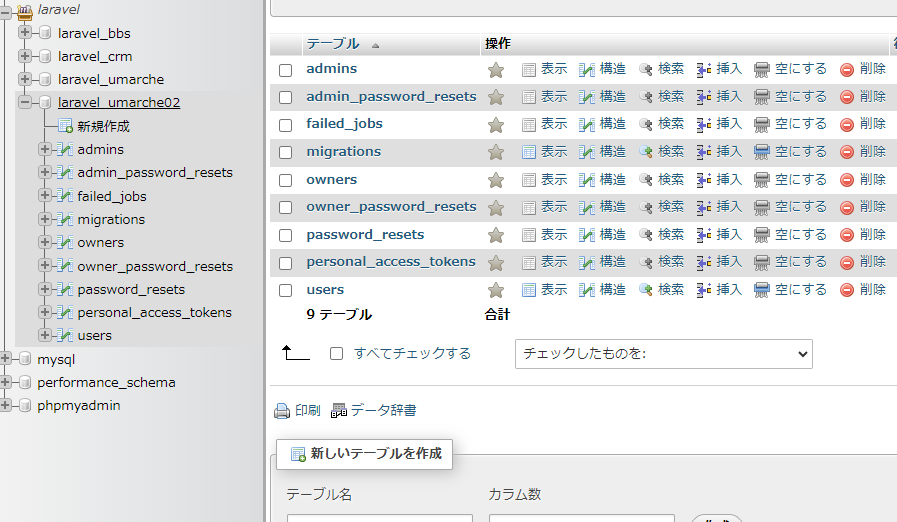
3.ルート設定
ユーザ用のルーティングは、Breezeをインストールした時に生成される「routes/auth.php」に設定されています。
販売者用(Owner)と管理者用(Admin)のルーティング処理を実装します。
Owner:routes/owner.php
Admin:routes/admin.php
<?php

use App\Http\Controllers\Owner\Auth\AuthenticatedSessionController;
use App\Http\Controllers\Owner\Auth\ConfirmablePasswordController;
use App\Http\Controllers\Owner\Auth\EmailVerificationNotificationController;
use App\Http\Controllers\Owner\Auth\EmailVerificationPromptController;
use App\Http\Controllers\Owner\Auth\NewPasswordController;
use App\Http\Controllers\Owner\Auth\PasswordResetLinkController;
use App\Http\Controllers\Owner\Auth\RegisteredUserController;
use App\Http\Controllers\Owner\Auth\VerifyEmailController;
use Illuminate\Support\Facades\Route;

Route::get('/', function () {
    return view('welcome');
});

Route::get('/dashboard', function () {
    return view('dashboard');
})->middleware(['auth'])->name('dashboard');

Route::middleware('guest')->group(function () {
    Route::get('register', [RegisteredUserController::class, 'create'])
                ->name('register');

    Route::post('register', [RegisteredUserController::class, 'store']);

    Route::get('login', [AuthenticatedSessionController::class, 'create'])
                ->name('login');

    Route::post('login', [AuthenticatedSessionController::class, 'store']);

    Route::get('forgot-password', [PasswordResetLinkController::class, 'create'])
                ->name('password.request');

    Route::post('forgot-password', [PasswordResetLinkController::class, 'store'])
                ->name('password.email');

    Route::get('reset-password/{token}', [NewPasswordController::class, 'create'])
                ->name('password.reset');

    Route::post('reset-password', [NewPasswordController::class, 'store'])
                ->name('password.update');
});

Route::middleware('auth')->group(function () {
    Route::get('verify-email', [EmailVerificationPromptController::class, '__invoke'])
                ->name('verification.notice');

    Route::get('verify-email/{id}/{hash}', [VerifyEmailController::class, '__invoke'])
                ->middleware(['signed', 'throttle:6,1'])
                ->name('verification.verify');

    Route::post('email/verification-notification', [EmailVerificationNotificationController::class, 'store'])
                ->middleware('throttle:6,1')
                ->name('verification.send');

    Route::get('confirm-password', [ConfirmablePasswordController::class, 'show'])
                ->name('password.confirm');

    Route::post('confirm-password', [ConfirmablePasswordController::class, 'store']);

    Route::post('logout', [AuthenticatedSessionController::class, 'destroy'])
                ->name('logout');
});
「routes/admin.php」には、上記コードをコピペして、名前空間の変更を行います。
「routes/auth.php」も名前空間の変更を行います。
// 「routes/admin.php」はコピペして、名前空間の修正
use App\Http\Controllers\Admin\Auth\AuthenticatedSessionController;
use App\Http\Controllers\Admin\Auth\ConfirmablePasswordController;
use App\Http\Controllers\Admin\Auth\EmailVerificationNotificationController;
use App\Http\Controllers\Admin\Auth\EmailVerificationPromptController;
use App\Http\Controllers\Admin\Auth\NewPasswordController;
use App\Http\Controllers\Admin\Auth\PasswordResetLinkController;
use App\Http\Controllers\Admin\Auth\RegisteredUserController;
use App\Http\Controllers\Admin\Auth\VerifyEmailController;

// 「routes/auth.php」の名前空間に、「user」ディレクトリを付ける
use App\Http\Controllers\User\Auth\AuthenticatedSessionController;
use App\Http\Controllers\User\Auth\ConfirmablePasswordController;
use App\Http\Controllers\User\Auth\EmailVerificationNotificationController;
use App\Http\Controllers\User\Auth\EmailVerificationPromptController;
use App\Http\Controllers\User\Auth\NewPasswordController;
use App\Http\Controllers\User\Auth\PasswordResetLinkController;
use App\Http\Controllers\User\Auth\RegisteredUserController;
use App\Http\Controllers\User\Auth\VerifyEmailController;
4.ルートサービスプロバイダ設定
ログインした後のリダイレクト先(ホームURL)とルーティングの設定
<?php

namespace App\Providers;

use Illuminate\Cache\RateLimiting\Limit;
use Illuminate\Foundation\Support\Providers\RouteServiceProvider as ServiceProvider;
use Illuminate\Http\Request;
use Illuminate\Support\Facades\RateLimiter;
use Illuminate\Support\Facades\Route;

class RouteServiceProvider extends ServiceProvider
{
    /**
     * The path to the "home" route for your application.
     *
     * This is used by Laravel authentication to redirect users after login.
     *
     * @var string
     */
    // user洋のホームURL
    public const HOME = '/dashboard';
    // 追加箇所
    // owner用のホームURL
    public const OWNER_HOME = '/owner/dashboard';
    // admin用のホームURL
    public const ADMIN_HOME = '/admin/dashboard';

    /**
     * The controller namespace for the application.
     *
     * When present, controller route declarations will automatically be prefixed with this namespace.
     *
     * @var string|null
     */
    // protected $namespace = 'App\\Http\\Controllers';

    /**
     * Define your route model bindings, pattern filters, etc.
     *
     * @return void
     */
    public function boot()
    {
        $this->configureRateLimiting();

        $this->routes(function () {
            Route::prefix('api')
                ->middleware('api')
                ->namespace($this->namespace)
                ->group(base_path('routes/api.php'));

            // 初期設定
            // Route::middleware('web')
            //     ->namespace($this->namespace)
            //     ->group(base_path('routes/web.php'));

            // 追加箇所
            // user用の設定
            // 「prefix」でownerとadminと付いていないURLは全てuser用URLにする
            // 「as」で「user.」という別名を指定。ルート情報をownerとadminで区別するため
            // webミドルウェアを「routes/web.php」の全てのルートを割り当てる
            Route::prefix('/')
                ->as('user.')
                ->middleware('web')
                ->namespace($this->namespace)
                ->group(base_path('routes/web.php'));
            // owner用の設定
            Route::prefix('owner')
                ->as('owner.')
                ->middleware('web')
                ->namespace($this->namespace)
                ->group(base_path('routes/owner.php'));
            // admin用の設定
            Route::prefix('admin')
                ->as('admin.')
                ->middleware('web')
                ->namespace($this->namespace)
                ->group(base_path('routes/admin.php'));
        });
    }

    /**
     * Configure the rate limiters for the application.
     *
     * @return void
     */
    protected function configureRateLimiting()
    {
        RateLimiter::for('api', function (Request $request) {
            return Limit::perMinute(60)->by(optional($request->user())->id ?: $request->ip());
        });
    }
}
5.ガード設定
Guardとは、Laravelの標準の認証機能で、「config.auth.php」から設定が可能です。
ログインが必要なページにアクセスしたときに、許可を承認する設定です。
今回は、adminとしてログインしている場合は、admin用のページにはアクセスできるが、ownerやuser用のページにはアクセスできないように設定します。
参考:https://readouble.com/laravel/8.x/ja/authentication.html
<?php

return [

    /*
    |--------------------------------------------------------------------------
    | Authentication Defaults
    |--------------------------------------------------------------------------
    |
    | This option controls the default authentication "guard" and password
    | reset options for your application. You may change these defaults
    | as required, but they're a perfect start for most applications.
    |
    */

    'defaults' => [
        // 修正
        // 'guard' => 'web',
        'guard' => 'users',
        'passwords' => 'users',
    ],

    /*
    |--------------------------------------------------------------------------
    | Authentication Guards
    |--------------------------------------------------------------------------
    |
    | Next, you may define every authentication guard for your application.
    | Of course, a great default configuration has been defined for you
    | here which uses session storage and the Eloquent user provider.
    |
    | All authentication drivers have a user provider. This defines how the
    | users are actually retrieved out of your database or other storage
    | mechanisms used by this application to persist your user's data.
    |
    | Supported: "session"
    |
    */

    'guards' => [
        'web' => [
            'driver' => 'session',
            'provider' => 'users',
        ],

        // 追加
        'users' => [
            'driver' => 'session',
            'provider' => 'users',
        ],

        'owners' => [
            'driver' => 'session',
            'provider' => 'owners',
        ],

        'admins' => [
            'driver' => 'session',
            'provider' => 'admins',
        ],
    ],

    /*
    |--------------------------------------------------------------------------
    | User Providers
    |--------------------------------------------------------------------------
    |
    | All authentication drivers have a user provider. This defines how the
    | users are actually retrieved out of your database or other storage
    | mechanisms used by this application to persist your user's data.
    |
    | If you have multiple user tables or models you may configure multiple
    | sources which represent each model / table. These sources may then
    | be assigned to any extra authentication guards you have defined.
    |
    | Supported: "database", "eloquent"
    |
    */

    'providers' => [
        'users' => [
            'driver' => 'eloquent',
            'model' => App\Models\User::class,
        ],

        // 追加
        'owners' => [
            'driver' => 'eloquent',
            'model' => App\Models\Owner::class,
        ],

        'admins' => [
            'driver' => 'eloquent',
            'model' => App\Models\Admin::class,
        ],

        // 'users' => [
        //     'driver' => 'database',
        //     'table' => 'users',
        // ],
    ],

    /*
    |--------------------------------------------------------------------------
    | Resetting Passwords
    |--------------------------------------------------------------------------
    |
    | You may specify multiple password reset configurations if you have more
    | than one user table or model in the application and you want to have
    | separate password reset settings based on the specific user types.
    |
    | The expire time is the number of minutes that each reset token will be
    | considered valid. This security feature keeps tokens short-lived so
    | they have less time to be guessed. You may change this as needed.
    |
    */

    'passwords' => [
        'users' => [
            'provider' => 'users',
            'table' => 'password_resets',
            'expire' => 60,
            'throttle' => 60,
        ],

        // 追加
        // provider:上で設定したプロバイダー名
        // table:マイグレーションファイル「2023_08_05_093020_create_owner_password_resets.php」
        'owners' => [
            'provider' => 'owners',
            'table' => 'owner_password_resets',
            'expire' => 60,
            'throttle' => 60,
        ],

        'admins' => [
            'provider' => 'admins',
            'table' => 'admin_password_resets',
            'expire' => 60,
            'throttle' => 60,
        ],
    ],

    /*
    |--------------------------------------------------------------------------
    | Password Confirmation Timeout
    |--------------------------------------------------------------------------
    |
    | Here you may define the amount of seconds before a password confirmation
    | times out and the user is prompted to re-enter their password via the
    | confirmation screen. By default, the timeout lasts for three hours.
    |
    */

    'password_timeout' => 10800,

];
6.ミドルウェア設定
6-1.ユーザーが未承認の場合のリダイレクト処理
adminでログインしていない場合は、adminのログイン画面にリダイレクト処理をします。
関連ページの条件分岐は下記サイトの記述で対応可能です。
https://shiro-changelife.com/laravel-url-judge/
<?php

namespace App\Http\Middleware;

use Illuminate\Auth\Middleware\Authenticate as Middleware;
use Illuminate\Support\Facades\Route; // 追加

class Authenticate extends Middleware
{

    // 追加
    // 「user.」とは「app/Providers/RouteServiceProvider.php」のasで設定した別名
    // ->as('user.')
    protected $user_route  = 'user.login';
    protected $owner_route = 'owner.login';
    protected $admin_route = 'admin.login';

    /**
     * Get the path the user should be redirected to when they are not authenticated.
     *
     * @param  \Illuminate\Http\Request  $request
     * @return string|null
     */
    protected function redirectTo($request)
    {
        // if (! $request->expectsJson()) {
        //     return route('login');
        // }

        if (! $request->expectsJson()) {
            // owner関連の全てのページの場合
            if(Route::is('owner.*')) {
              return route($this->owner_route);
            } elseif(Route::is('admin.*')) {
              return route($this->admin_route);
            } else {
              return route($this->user_route);
            }
        }
    }
}
6-2.ログイン済みユーザーのリダイレクト処理
adminとしてログインしている場合に、adminのログイン画面に遷移したときに、ダッシュボードにリダイレクト処理をします。
<?php

namespace App\Http\Middleware;

use App\Providers\RouteServiceProvider;
use Closure;
use Illuminate\Http\Request;
use Illuminate\Support\Facades\Auth;

class RedirectIfAuthenticated
{
    // 追加
    // 「config/auth.php」のprovidersで設定したプロバイダー名
    private const GUARD_USER  = 'users';
    private const GUARD_OWNER = 'owners';
    private const GUARD_ADMIN = 'admins';

    /**
     * Handle an incoming request.
     *
     * @param  \Illuminate\Http\Request  $request
     * @param  \Closure(\Illuminate\Http\Request): (\Illuminate\Http\Response|\Illuminate\Http\RedirectResponse)  $next
     * @param  string|null  ...$guards
     * @return \Illuminate\Http\Response|\Illuminate\Http\RedirectResponse
     */
    public function handle(Request $request, Closure $next, ...$guards)
    {
        // 修正
        // $guards = empty($guards) ? [null] : $guards;

        // foreach ($guards as $guard) {
        //     if (Auth::guard($guard)->check()) {
        //         return redirect(RouteServiceProvider::HOME);
        //     }
        // }

        // 追加
        // userとしてログインしていて、尚且つuserの関連ページの場合
        if(Auth::guard(self::GUARD_USER)->check() && $request->routeIs('user.*')) {
          return redirect(RouteServiceProvider::HOME);
        }

        if(Auth::guard(self::GUARD_OWNER)->check() && $request->routeIs('owner.*')) {
          return redirect(RouteServiceProvider::OWNER_HOME);
        }

        if(Auth::guard(self::GUARD_ADMIN)->check() && $request->routeIs('admin.*')) {
          return redirect(RouteServiceProvider::ADMIN_HOME);
        }

        return $next($request);
    }
}
7.リクエストクラス設定
ログインフォームに入力された値からパスワードを比較・認証する設定を行います。
<?php

namespace App\Http\Requests\Auth;

use Illuminate\Auth\Events\Lockout;
use Illuminate\Foundation\Http\FormRequest;
use Illuminate\Support\Facades\Auth;
use Illuminate\Support\Facades\RateLimiter;
use Illuminate\Support\Str;
use Illuminate\Validation\ValidationException;

class LoginRequest extends FormRequest
{
    /**
     * Determine if the user is authorized to make this request.
     *
     * @return bool
     */
    public function authorize()
    {
        return true;
    }

    /**
     * Get the validation rules that apply to the request.
     *
     * @return array
     */
    public function rules()
    {
        return [
            'email' => ['required', 'string', 'email'],
            'password' => ['required', 'string'],
        ];
    }

    /**
     * Attempt to authenticate the request's credentials.
     *
     * @return void
     *
     * @throws \Illuminate\Validation\ValidationException
     */
    public function authenticate()
    {
        $this->ensureIsNotRateLimited();

        // 修正箇所
        // 「config/auth.php」のprovidersで設定したプロバイダー名
        if($this->routeIs('owner.*')) {
          $guard = 'owners';
        } elseif($this->routeIs('admin.*')) {
          $guard = 'admins';
        } else {
          $guard = 'users';
        }

        // if (! Auth::attempt($this->only('email', 'password'), $this->boolean('remember'))) {
        if (! Auth::guard($guard)->attempt($this->only('email', 'password'), $this->boolean('remember'))) {
            RateLimiter::hit($this->throttleKey());

            throw ValidationException::withMessages([
                'email' => trans('auth.failed'),
            ]);
        }

        RateLimiter::clear($this->throttleKey());
    }

    /**
     * Ensure the login request is not rate limited.
     *
     * @return void
     *
     * @throws \Illuminate\Validation\ValidationException
     */
    public function ensureIsNotRateLimited()
    {
        if (! RateLimiter::tooManyAttempts($this->throttleKey(), 5)) {
            return;
        }

        event(new Lockout($this));

        $seconds = RateLimiter::availableIn($this->throttleKey());

        throw ValidationException::withMessages([
            'email' => trans('auth.throttle', [
                'seconds' => $seconds,
                'minutes' => ceil($seconds / 60),
            ]),
        ]);
    }

    /**
     * Get the rate limiting throttle key for the request.
     *
     * @return string
     */
    public function throttleKey()
    {
        return Str::lower($this->input('email')).'|'.$this->ip();
    }
}
8.コントローラー&ブレード作成
8-1.ルーティングの修正
「3.ルート設定」の時に作成した「routes/owner.php」と「routes/admin.php」を修正します。
<?php

use App\Http\Controllers\Owner\Auth\AuthenticatedSessionController;
use App\Http\Controllers\Owner\Auth\ConfirmablePasswordController;
use App\Http\Controllers\Owner\Auth\EmailVerificationNotificationController;
use App\Http\Controllers\Owner\Auth\EmailVerificationPromptController;
use App\Http\Controllers\Owner\Auth\NewPasswordController;
use App\Http\Controllers\Owner\Auth\PasswordResetLinkController;
use App\Http\Controllers\Owner\Auth\RegisteredUserController;
use App\Http\Controllers\Owner\Auth\VerifyEmailController;
use Illuminate\Support\Facades\Route;

Route::get('/', function () {
    // return view('welcome');
    return view('owner.welcome');
});

Route::get('/dashboard', function () {
    // return view('dashboard');
    return view('owner.dashboard');
// })->middleware(['auth'])->name('dashboard');
// ownersにログイン時(権限を持っている)に修正
})->middleware(['auth:owners'])->name('dashboard');

Route::middleware('guest')->group(function () {
    Route::get('register', [RegisteredUserController::class, 'create'])
                ->name('register');

    Route::post('register', [RegisteredUserController::class, 'store']);

    Route::get('login', [AuthenticatedSessionController::class, 'create'])
                ->name('login');

    Route::post('login', [AuthenticatedSessionController::class, 'store']);

    Route::get('forgot-password', [PasswordResetLinkController::class, 'create'])
                ->name('password.request');

    Route::post('forgot-password', [PasswordResetLinkController::class, 'store'])
                ->name('password.email');

    Route::get('reset-password/{token}', [NewPasswordController::class, 'create'])
                ->name('password.reset');

    Route::post('reset-password', [NewPasswordController::class, 'store'])
                ->name('password.update');
});

// ownersにログイン時(権限を持っている)に修正
Route::middleware('auth:owners')->group(function () {
    Route::get('verify-email', [EmailVerificationPromptController::class, '__invoke'])
                ->name('verification.notice');

    Route::get('verify-email/{id}/{hash}', [VerifyEmailController::class, '__invoke'])
                ->middleware(['signed', 'throttle:6,1'])
                ->name('verification.verify');

    Route::post('email/verification-notification', [EmailVerificationNotificationController::class, 'store'])
                ->middleware('throttle:6,1')
                ->name('verification.send');

    Route::get('confirm-password', [ConfirmablePasswordController::class, 'show'])
                ->name('password.confirm');

    Route::post('confirm-password', [ConfirmablePasswordController::class, 'store']);

    Route::post('logout', [AuthenticatedSessionController::class, 'destroy'])
                ->name('logout');
});
<?php
use Illuminate\Support\Facades\Route;
/*
|--------------------------------------------------------------------------
| Web Routes
|--------------------------------------------------------------------------
|
| Here is where you can register web routes for your application. These
| routes are loaded by the RouteServiceProvider within a group which
| contains the "web" middleware group. Now create something great!
|
*/
Route::get('/', function () {
// return view('welcome');
return view('user.welcome');
});
Route::get('/dashboard', function () {
// return view('dashboard');
return view('user.dashboard');
})->middleware(['auth:users'])->name('dashboard');
require __DIR__.'/auth.php';8-2.コントローラーの複製
Laravel Breezeをインストールした時に、生成されたコントローラーのAuthディレクトリを修正と複製します。
app\Http\Controllers\Auth\ファイル
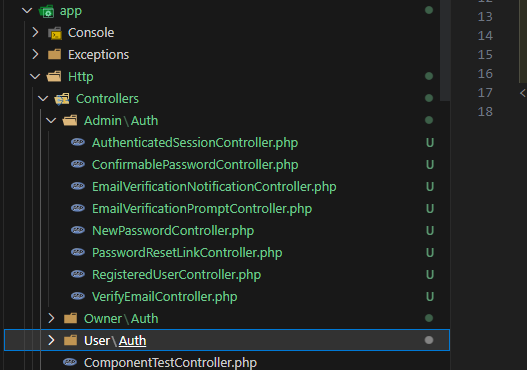
デフォルトは上記のディレクトリ構成になっていますが、adminとownerとuserが必要なので、下記のディレクトリ構成に変更します。
app/Http/Controllers/User/Auth/ファイル
app/Http/Controllers/Owner/Auth/ファイル
app/Http/Controllers/Admin/Auth/ファイル
Controllersディレクトリの中にuserディレクトリを作成して、その中にAuthディレクトリを入れます。
userディレクトリを複製して、名前を変更するだけです。
// コントローラーの修正箇所
// view('login')
view('owner.login')
// RouteServiceProvider::HOME
RouteServiceProvider::OWNER_HOME
// Auth::guard('web')->logout()
Auth::guard('owners')->logout()「app/Http/Controllers/Owner/Auth/」の8ファイル全てを修正する必要がありますので、しっかりと確認しておきましょう。
<?php

//修正
// namespace App\Http\Controllers\Auth;
namespace App\Http\Controllers\Owner\Auth;

use App\Http\Controllers\Controller;
use App\Http\Requests\Auth\LoginRequest;
use App\Providers\RouteServiceProvider;
use Illuminate\Http\Request;
use Illuminate\Support\Facades\Auth;

class AuthenticatedSessionController extends Controller
{
    /**
     * Display the login view.
     *
     * @return \Illuminate\View\View
     */
    public function create()
    {
        //修正
        // return view('auth.login');
        return view('owner.auth.login');
    }

    /**
     * Handle an incoming authentication request.
     *
     * @param  \App\Http\Requests\Auth\LoginRequest  $request
     * @return \Illuminate\Http\RedirectResponse
     */
    public function store(LoginRequest $request)
    {
        $request->authenticate();

        $request->session()->regenerate();

        // return redirect()->intended(RouteServiceProvider::HOME);
        return redirect()->intended(RouteServiceProvider::OWNER_HOME);
    }

    /**
     * Destroy an authenticated session.
     *
     * @param  \Illuminate\Http\Request  $request
     * @return \Illuminate\Http\RedirectResponse
     */
    public function destroy(Request $request)
    {
        //修正
        // Auth::guard('web')->logout();
        Auth::guard('owners')->logout();

        $request->session()->invalidate();

        $request->session()->regenerateToken();

        //修正
        // return redirect('/');
        return redirect('/owner');
    }
}
<?php
//修正
// namespace App\Http\Controllers\Auth;
namespace App\Http\Controllers\Owner\Auth;
use App\Http\Controllers\Controller;
use App\Providers\RouteServiceProvider;
use Illuminate\Http\Request;
use Illuminate\Support\Facades\Auth;
use Illuminate\Validation\ValidationException;
class ConfirmablePasswordController extends Controller
{
/**
* Show the confirm password view.
*
* @return \Illuminate\View\View
*/
public function show()
{
// 修正
// return view('auth.confirm-password');
return view('owner.auth.confirm-password');
}
/**
* Confirm the user's password.
*
* @param \Illuminate\Http\Request $request
* @return mixed
*/
public function store(Request $request)
{
// 修正
// if (! Auth::guard('web')->validate([
if (! Auth::guard('owners')->validate([
'email' => $request->user()->email,
'password' => $request->password,
])) {
throw ValidationException::withMessages([
'password' => __('auth.password'),
]);
}
$request->session()->put('auth.password_confirmed_at', time());
// 修正
// return redirect()->intended(RouteServiceProvider::HOME);
return redirect()->intended(RouteServiceProvider::OWNER_HOME);
}
}<?php
//修正
// namespace App\Http\Controllers\Auth;
namespace App\Http\Controllers\Owner\Auth;
use App\Http\Controllers\Controller;
use App\Providers\RouteServiceProvider;
use Illuminate\Http\Request;
class EmailVerificationNotificationController extends Controller
{
/**
* Send a new email verification notification.
*
* @param \Illuminate\Http\Request $request
* @return \Illuminate\Http\RedirectResponse
*/
public function store(Request $request)
{
if ($request->user()->hasVerifiedEmail()) {
// 修正
// return redirect()->intended(RouteServiceProvider::HOME);
return redirect()->intended(RouteServiceProvider::OWNER_HOME);
}
$request->user()->sendEmailVerificationNotification();
return back()->with('status', 'verification-link-sent');
}
}<?php
//修正
// namespace App\Http\Controllers\Auth;
namespace App\Http\Controllers\Owner\Auth;
use App\Http\Controllers\Controller;
use App\Providers\RouteServiceProvider;
use Illuminate\Http\Request;
class EmailVerificationPromptController extends Controller
{
/**
* Display the email verification prompt.
*
* @param \Illuminate\Http\Request $request
* @return mixed
*/
public function __invoke(Request $request)
{
return $request->user()->hasVerifiedEmail()
// 修正
// ? redirect()->intended(RouteServiceProvider::HOME)
? redirect()->intended(RouteServiceProvider::OWNER_HOME)
: view('owner.auth.verify-email');
}
}<?php
//修正
// namespace App\Http\Controllers\Auth;
namespace App\Http\Controllers\Owner\Auth;
use App\Http\Controllers\Controller;
use Illuminate\Auth\Events\PasswordReset;
use Illuminate\Http\Request;
use Illuminate\Support\Facades\Hash;
use Illuminate\Support\Facades\Password;
use Illuminate\Support\Str;
use Illuminate\Validation\Rules;
class NewPasswordController extends Controller
{
/**
* Display the password reset view.
*
* @param \Illuminate\Http\Request $request
* @return \Illuminate\View\View
*/
public function create(Request $request)
{
// 修正
// return view('auth.reset-password', ['request' => $request]);
return view('owner.auth.reset-password', ['request' => $request]);
}
/**
* Handle an incoming new password request.
*
* @param \Illuminate\Http\Request $request
* @return \Illuminate\Http\RedirectResponse
*
* @throws \Illuminate\Validation\ValidationException
*/
public function store(Request $request)
{
$request->validate([
'token' => ['required'],
'email' => ['required', 'email'],
'password' => ['required', 'confirmed', Rules\Password::defaults()],
]);
// Here we will attempt to reset the user's password. If it is successful we
// will update the password on an actual user model and persist it to the
// database. Otherwise we will parse the error and return the response.
$status = Password::reset(
$request->only('email', 'password', 'password_confirmation', 'token'),
function ($user) use ($request) {
$user->forceFill([
'password' => Hash::make($request->password),
'remember_token' => Str::random(60),
])->save();
event(new PasswordReset($user));
}
);
// If the password was successfully reset, we will redirect the user back to
// the application's home authenticated view. If there is an error we can
// redirect them back to where they came from with their error message.
return $status == Password::PASSWORD_RESET
// 修正
// ? redirect()->route('login')->with('status', __($status))
? redirect()->route('owner.login')->with('status', __($status))
: back()->withInput($request->only('email'))
->withErrors(['email' => __($status)]);
}
}<?php
//修正
// namespace App\Http\Controllers\Auth;
namespace App\Http\Controllers\Owner\Auth;
use App\Http\Controllers\Controller;
use Illuminate\Http\Request;
use Illuminate\Support\Facades\Password;
class PasswordResetLinkController extends Controller
{
/**
* Display the password reset link request view.
*
* @return \Illuminate\View\View
*/
public function create()
{
// 修正
// return view('auth.forgot-password');
return view('owner.auth.forgot-password');
}
/**
* Handle an incoming password reset link request.
*
* @param \Illuminate\Http\Request $request
* @return \Illuminate\Http\RedirectResponse
*
* @throws \Illuminate\Validation\ValidationException
*/
public function store(Request $request)
{
$request->validate([
'email' => ['required', 'email'],
]);
// We will send the password reset link to this user. Once we have attempted
// to send the link, we will examine the response then see the message we
// need to show to the user. Finally, we'll send out a proper response.
$status = Password::sendResetLink(
$request->only('email')
);
return $status == Password::RESET_LINK_SENT
? back()->with('status', __($status))
: back()->withInput($request->only('email'))
->withErrors(['email' => __($status)]);
}
}<?php
//修正
// namespace App\Http\Controllers\Auth;
namespace App\Http\Controllers\Owner\Auth;
use App\Http\Controllers\Controller;
//修正
// use App\Models\User;
use App\Models\Owner;
use App\Providers\RouteServiceProvider;
use Illuminate\Auth\Events\Registered;
use Illuminate\Http\Request;
use Illuminate\Support\Facades\Auth;
use Illuminate\Support\Facades\Hash;
use Illuminate\Validation\Rules;
class RegisteredUserController extends Controller
{
/**
* Display the registration view.
*
* @return \Illuminate\View\View
*/
public function create()
{
// 修正
// return view('auth.register');
return view('owner.auth.register');
}
/**
* Handle an incoming registration request.
*
* @param \Illuminate\Http\Request $request
* @return \Illuminate\Http\RedirectResponse
*
* @throws \Illuminate\Validation\ValidationException
*/
public function store(Request $request)
{
$request->validate([
'name' => ['required', 'string', 'max:255'],
// 修正
// 'email' => ['required', 'string', 'email', 'max:255', 'unique:users'],
'email' => ['required', 'string', 'email', 'max:255', 'unique:owners'],
'password' => ['required', 'confirmed', Rules\Password::defaults()],
]);
// 修正
// $user = User::create([
$user = Owner::create([
'name' => $request->name,
'email' => $request->email,
'password' => Hash::make($request->password),
]);
event(new Registered($user));
// 修正
// Auth::login($user);
Auth::guard('owners')->login($user);
// 修正
// return redirect(RouteServiceProvider::HOME);
return redirect(RouteServiceProvider::OWNER_HOME);
}
}<?php
//修正
// namespace App\Http\Controllers\Auth;
namespace App\Http\Controllers\Owner\Auth;
use App\Http\Controllers\Controller;
use App\Providers\RouteServiceProvider;
use Illuminate\Auth\Events\Verified;
use Illuminate\Foundation\Auth\EmailVerificationRequest;
class VerifyEmailController extends Controller
{
/**
* Mark the authenticated user's email address as verified.
*
* @param \Illuminate\Foundation\Auth\EmailVerificationRequest $request
* @return \Illuminate\Http\RedirectResponse
*/
public function __invoke(EmailVerificationRequest $request)
{
if ($request->user()->hasVerifiedEmail()) {
// 修正
// return redirect()->intended(RouteServiceProvider::HOME.'?verified=1');
return redirect()->intended(RouteServiceProvider::OWNER_HOME.'?verified=1');
}
if ($request->user()->markEmailAsVerified()) {
event(new Verified($request->user()));
}
// 修正
// return redirect()->intended(RouteServiceProvider::HOME.'?verified=1');
return redirect()->intended(RouteServiceProvider::OWNER_HOME.'?verified=1');
}
}「app/Http/Controllers/Admin/Auth/」と「app/Http/Controllers/User/Auth/」のファイルも同様の修正を行います。
// 「app/Http/Controllers/Admin/Auth/」のファイルは、下記の箇所は修正しないようにします。
// 変数HOME
return redirect()->intended(RouteServiceProvider::HOME);
// リダイレクトURL
return redirect('/');

// 修正の共通の注意点
// 単数形と複数形を間違えない
// view関数は表示するディレクトリを記述して、下記のファイルを表示する
// resources/views/owner/auth/login.blade.php
return view('owner.auth.login');

// プロバイダー名なので、複数形で記述
Auth::guard('owners')->logout();

// リダイレクトさせるURL
return redirect('/owner');
8-3.bladeの複製
resources/views/auth/
デフォルトは上記のディレクトリ構成になっていますが、adminとownerとuserが必要なので、下記のディレクトリ構成に変更します。
resources/views/user/auth/
resources/views/owner/auth/
resources/views/admin/auth/
viewディレクトリの中にuserディレクトリを作成して、その中にauthディレクトリを入れます。
userディレクトリを複製して、名前を変更するだけです。
「dashboard.blade.php」と「welcome.blade.php」は下記のフォルダに配置します。
resources/views/user/
resources/views/owner/
resources/views/admin/
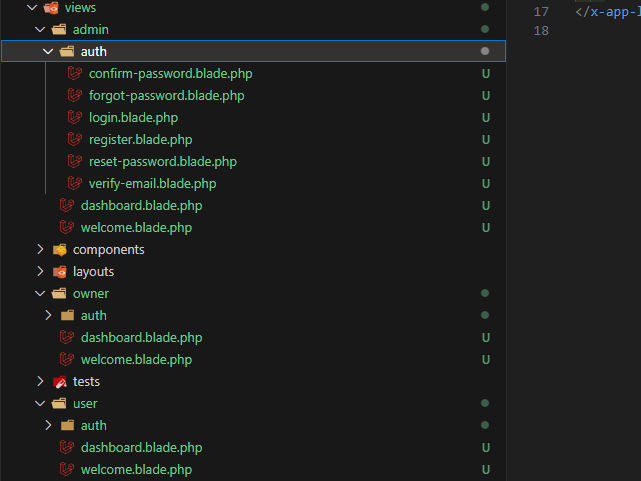
「resources/views/user/」のディレクトリの7ファイル(dashboard.blade.phpを除く)を修正します。
今回はそこまで難しくはないので、2ファイルのみ参考として記述します。
{{-- resources/views/owner/welcome.blade.phpファイルの修正箇所だけ --}}
{{-- @if (Route::has('login')) --}}
@if (Route::has('owner.login'))
    <div class="hidden fixed top-0 right-0 px-6 py-4 sm:block">
        {{-- @auth --}}
        @auth('owners')
            {{-- <a href="{{ url('/dashboard') }}" class="text-sm text-gray-700 dark:text-gray-500 underline">Dashboard</a> --}}
            <a href="{{ url('/owner/dashboard') }}" class="text-sm text-gray-700 dark:text-gray-500 underline">Dashboard</a>
        @else
            {{-- <a href="{{ route('login') }}" class="text-sm text-gray-700 dark:text-gray-500 underline">Log in</a> --}}
            <a href="{{ route('owner.login') }}" class="text-sm text-gray-700 dark:text-gray-500 underline">Log in</a>

            {{-- @if (Route::has('register')) --}}
            @if (Route::has('owner.register'))
                {{-- <a href="{{ route('register') }}" class="ml-4 text-sm text-gray-700 dark:text-gray-500 underline">Register</a> --}}
                <a href="{{ route('owner.register') }}" class="ml-4 text-sm text-gray-700 dark:text-gray-500 underline">Register</a>
            @endif
        @endauth
    </div>
@endif
<x-guest-layout>
<x-auth-card>
<x-slot name="logo">
<a href="/">
<x-application-logo class="w-20 h-20 fill-current text-gray-500" />
</a>
</x-slot>
<div class="mb-4 text-sm text-gray-600">
{{ __('This is a secure area of the application. Please confirm your password before continuing.') }}
</div>
<!-- Validation Errors -->
<x-auth-validation-errors class="mb-4" :errors="$errors" />
{{-- <form method="POST" action="{{ route('password.confirm') }}"> --}}
<form method="POST" action="{{ route('owner.password.confirm') }}">
@csrf
<!-- Password -->
<div>
<x-label for="password" :value="__('Password')" />
<x-input id="password" class="block mt-1 w-full"
type="password"
name="password"
required autocomplete="current-password" />
</div>
<div class="flex justify-end mt-4">
<x-button>
{{ __('Confirm') }}
</x-button>
</div>
</form>
</x-auth-card>
</x-guest-layout>注意点は下記です。
// 「@auth」はログイン判定で、下記既述のようにguardを使って、切り替える
@auth('owners')

// route関数には、ownerを追加
{{ route('owner.login') }}
8-4.レイアウトファイルの修正
「resources/views/layouts/navigation.blade.php」ファイルがヘルパ関数(Laravel独自の関数)がユーザー用に設定されているため、複製して下記3つのファイルを作成する
navigation-user.blade.php
navigation-owner.blade.php
navigation-admin.blade.php
「route」と検索すると9か所発見できるので、全てに「user」か「owner」か「admin」を付けます。
<nav x-data="{ open: false }" class="bg-white border-b border-gray-100">
    <!-- Primary Navigation Menu -->
    <div class="max-w-7xl mx-auto px-4 sm:px-6 lg:px-8">
        <div class="flex justify-between h-16">
            <div class="flex">
                <!-- Logo -->
                <div class="shrink-0 flex items-center">
                    <a href="{{ route('owner.dashboard') }}">
                        <x-application-logo class="block h-10 w-auto fill-current text-gray-600" />
                    </a>
                </div>

                <!-- Navigation Links -->
                <div class="hidden space-x-8 sm:-my-px sm:ml-10 sm:flex">
                    <x-nav-link :href="route('owner.dashboard')" :active="request()->routeIs('owner.dashboard')">
                        {{ __('Dashboard') }}
                    </x-nav-link>
                </div>
            </div>

            <!-- Settings Dropdown -->
            <div class="hidden sm:flex sm:items-center sm:ml-6">
                <x-dropdown align="right" width="48">
                    <x-slot name="trigger">
                        <button class="flex items-center text-sm font-medium text-gray-500 hover:text-gray-700 hover:border-gray-300 focus:outline-none focus:text-gray-700 focus:border-gray-300 transition duration-150 ease-in-out">
                            <div>{{ Auth::user()->name }}</div>

                            <div class="ml-1">
                                <svg class="fill-current h-4 w-4" xmlns="http://www.w3.org/2000/svg" viewBox="0 0 20 20">
                                    <path fill-rule="evenodd" d="M5.293 7.293a1 1 0 011.414 0L10 10.586l3.293-3.293a1 1 0 111.414 1.414l-4 4a1 1 0 01-1.414 0l-4-4a1 1 0 010-1.414z" clip-rule="evenodd" />
                                </svg>
                            </div>
                        </button>
                    </x-slot>

                    <x-slot name="content">
                        <!-- Authentication -->
                        <form method="POST" action="{{ route('owner.logout') }}">
                            @csrf

                            <x-dropdown-link :href="route('owner.logout')"
                                    onclick="event.preventDefault();
                                                this.closest('form').submit();">
                                {{ __('Log Out') }}
                            </x-dropdown-link>
                        </form>
                    </x-slot>
                </x-dropdown>
            </div>

            <!-- Hamburger -->
            <div class="-mr-2 flex items-center sm:hidden">
                <button @click="open = ! open" class="inline-flex items-center justify-center p-2 rounded-md text-gray-400 hover:text-gray-500 hover:bg-gray-100 focus:outline-none focus:bg-gray-100 focus:text-gray-500 transition duration-150 ease-in-out">
                    <svg class="h-6 w-6" stroke="currentColor" fill="none" viewBox="0 0 24 24">
                        <path :class="{'hidden': open, 'inline-flex': ! open }" class="inline-flex" stroke-linecap="round" stroke-linejoin="round" stroke-width="2" d="M4 6h16M4 12h16M4 18h16" />
                        <path :class="{'hidden': ! open, 'inline-flex': open }" class="hidden" stroke-linecap="round" stroke-linejoin="round" stroke-width="2" d="M6 18L18 6M6 6l12 12" />
                    </svg>
                </button>
            </div>
        </div>
    </div>

    <!-- Responsive Navigation Menu -->
    <div :class="{'block': open, 'hidden': ! open}" class="hidden sm:hidden">
        <div class="pt-2 pb-3 space-y-1">
            <x-responsive-nav-link :href="route('owner.dashboard')" :active="request()->routeIs('owner.dashboard')">
                {{ __('Dashboard') }}
            </x-responsive-nav-link>
        </div>

        <!-- Responsive Settings Options -->
        <div class="pt-4 pb-1 border-t border-gray-200">
            <div class="px-4">
                <div class="font-medium text-base text-gray-800">{{ Auth::user()->name }}</div>
                <div class="font-medium text-sm text-gray-500">{{ Auth::user()->email }}</div>
            </div>

            <div class="mt-3 space-y-1">
                <!-- Authentication -->
                <form method="POST" action="{{ route('owner.logout') }}">
                    @csrf

                    <x-responsive-nav-link :href="route('owner.logout')"
                            onclick="event.preventDefault();
                                        this.closest('form').submit();">
                        {{ __('Log Out') }}
                    </x-responsive-nav-link>
                </form>
            </div>
        </div>
    </div>
</nav>「navigation.blade.php」を読み込んでいた、「resources/views/layouts/app.blade.php」ファイルを条件分岐で読み込みを修正する。
<body class="font-sans antialiased">
    <div class="min-h-screen bg-gray-100">
        <!-- @include('layouts.navigation') -->

        @if(auth('admins')->user())
          @include('layouts.navigation-admin')
        @elseif(auth('owners')->user())
          @include('layouts.navigation-owner')
        @elseif(auth('users')->user())
          @include('layouts.navigation-user')
        @endif

        <!-- Page Heading -->
        <header class="bg-white shadow">
            <div class="max-w-7xl mx-auto py-6 px-4 sm:px-6 lg:px-8">
                {{ $header }}
            </div>
        </header>

        <!-- Page Content -->
        <main>
            {{ $slot }}
        </main>
    </div>
</body>
表示確認
以上で実装は完了になります。
後は、ミスがないかの実装確認になります。
私はXAMPPを使っているので、管理者用とオーナー用とユーザー用のページが下記になります。
http://127.0.0.1:8000/admin/
http://127.0.0.1:8000/owner/
http://127.0.0.1:8000/
下記がコードです。
https://github.com/yuki918/laravel_umarche02/tree/sec04_multilogin